Adding a Custom RBL
The Custom RBL feature lets you add custom RBLs and URIBLs to your account, that we do not normally monitor.
You can add a Custom RBL via the RBL Monitoring ➡️ Manage ➡️ Custom RBLs section of the Portal:
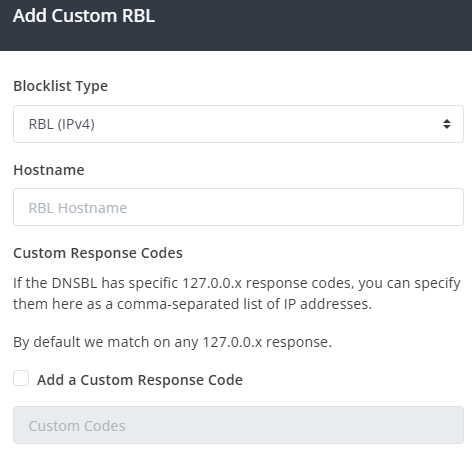
Select the RBL type (either RBL or URIBL), and specify the Hostname of the RBL to add.
This RBL must be set up like a "standard" DNSBL, as per this description. When you add one, we verify it live against the RFC 5782 test conventions before saving it. We reject anything that does not behave like a working blocklist.
- RBL: the zone must return a
127.0.0.xlisting for the standard test address127.0.0.2. It must not list127.0.0.1. - URIBL: the zone must return a
127.0.0.xlisting for the RFC 5782testentry. It must not list the reservedinvalidname. - No wildcards: we reject a zone that lists values that should never be listed, such as
127.0.0.1,invalid, or known-clean domains. That zone would flag everything and cause false positives. - Not already built in: you cannot add a host we already provide as a standard data source. It is already available on your Monitoring Profiles.
If we cannot confirm the zone during this check, we do not add it. This includes a zone that does not answer for the test entry, and one we could not reach because of a temporary DNS error. In that case, wait a moment and add it again.
Once you've added the Custom RBL, you must remember to enable this RBL on your Monitoring Profile(s).