How Do I Use the API?
We include a simple read/write API, that lets you poll our database for the current status of your hosts, as well as manage Hosts and Contacts on your account.
The API can easily be integrated into existing monitoring systems, like Nagios or Zabbix, by performing a simple HTTP GET request for the list of currently listed hosts. The response data can be returned either as simple XML, or as a JSON object.
$ curl -G https://api.generatorlabs.com/4.0/rbl/listings.json \
    -u 'your_account_sid:your_auth_token'
{
  "status_code": 200,
  "status_message": "Listings",
  "page": 1,
  "page_size": 100,
  "total_pages": 1,
  "total": 1,
  "total_listed": 1,
  "data": [
    {
      "id": "HT1a2b3c4d5e6f7890abcdef1234567890",
      "host": "mail.example.com",
      "name": "Production Mail Server",
      "type": "rbl",
      "parent": null,
      "status": "active",
      "profile": "RP9f8e7d6c5b4a3210fedcba0987654321",
      "contact_group": [
        "CG4f3e2d1c0b9a8776655443322110fedc"
      ],
      "last_checked": "2024-01-20 14:22:00 EST",
      "first_listed": "2024-01-19 08:00:00 EST",
      "listed_period": "1 day 6 hours",
      "listed": true,
      "listed_count": 1,
      "listed_details": [
        {
          "rbl": "RB2d6b6be7c352d5e39756d004ee797388",
          "host": "zen.spamhaus.org",
          "website": "https://www.spamhaus.org/zen/",
          "details": null,
          "result": "listed",
          "pass_fail": false
        }
      ],
      "tags": []
    }
  ]
}
Every response includes a status_code (which mirrors the HTTP status) and a status_message. For the full list of status codes and how to handle them, see the API Error Reference.
We also provide downloadable plugins for Nagios, Zabbix, and Prometheus, that can get you up and running within a few minutes.
We can also be integrated into your existing provisioning systems, to automatically add / remove monitoring of hosts, as resources are allocated on your system. This ensures that only those hosts that are in-use are monitored.
$ curl -X POST https://api.generatorlabs.com/4.0/rbl/hosts.json \
    -u 'your_account_sid:your_auth_token' \
    -d name='My New Host' \
    -d host='10.10.10.11' \
    -d profile='RP9f8e7d6c5b4a3210fedcba0987654321' \
    -d contact_group='CG4f3e2d1c0b9a8776655443322110fedc,CG5a6b7c8d9e0f1234567890abcdef1234' \
    -d tags='production,web'
{
  "status_code": 200,
  "status_message": "Host added successfully.",
  "data": [
    {
      "id": "HTe092d4858135fad83dc938618a4ebfbf",
      "host": "10.10.10.11",
      "name": "My New Host",
      "parent": null
    }
  ]
}
Getting Started
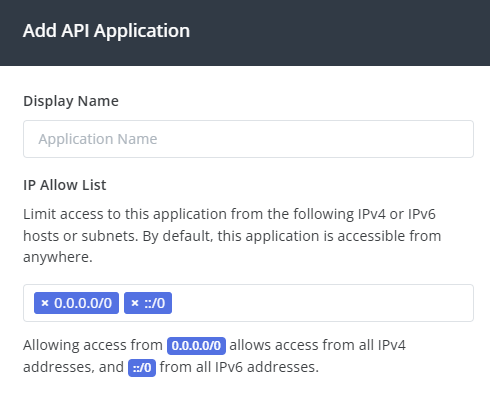
To get started with the API, visit the Development ➡️ Applications section of the Portal. From this section, you can create one or more API Applications, each of which has their own Auth Token for authenticating API requests.
Each API Application also includes request and errors stats, including a graph breakdown of requests, and a error log with detailed details about the error conditions:
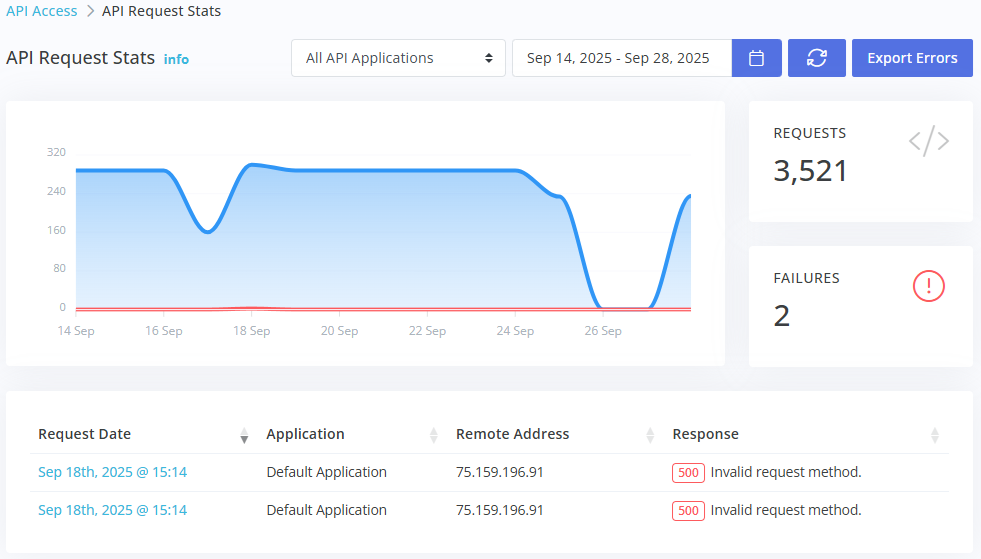
Customers can add as many API Applications as they like, each of which can be separately managed and reported on.
Auth Tokens
Click View Credentials on an API Application to open its credentials page. It shows your Account SID and the application's active auth tokens: each token's last four characters, its Status (Active, or Revokes with a date), when it was Added and when it was Last Used.
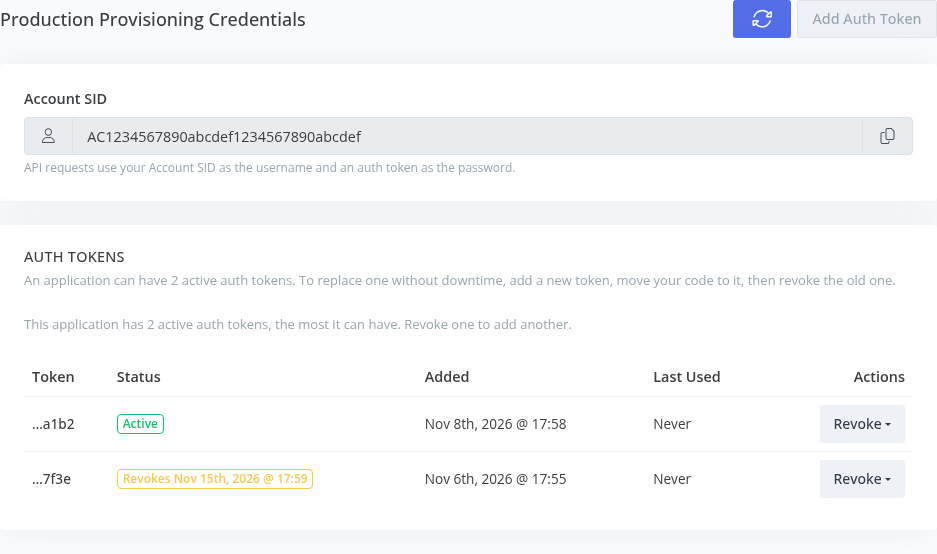
An auth token is shown only once: when you add the application, and when you click Add Auth Token. Copy it then, and click I've Copied It. We only store a hash of it, so it can't be shown again. If you lose an auth token, add a new one and revoke the lost one. Auth tokens you already have keep working.
An API Application can have at most two active auth tokens, for example one for each of two servers. With two, Add Auth Token is greyed out until you revoke one.
Each token's Revoke menu revokes it now, or in 1 hour, 24 hours or 7 days. Revoke Now asks you to confirm: the token stops working immediately, and it can't be undone. A token with a later revoke shows Revokes and the date, and its menu offers Cancel Revoke to keep it active until then. A revoked token is removed from the page and stops working at once.
To replace an auth token without downtime, add a new one, move your code to it, then revoke the old one, now or later to give yourself time. Last Used on the old token helps confirm nothing still uses it.