Telegram
Adding a Contact
To start receiving notifications via Telegram, follow the steps below:
In Telegram
Open the Telegram app, and search for the GeneratorLabsBot:
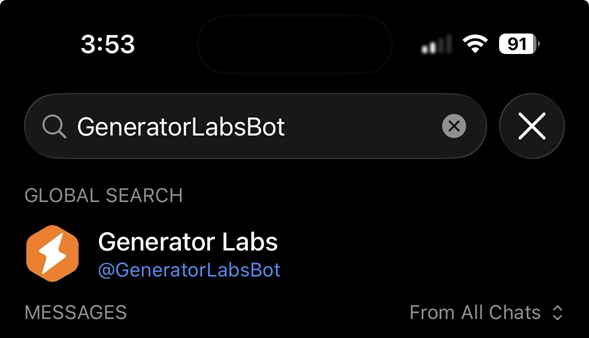
Then start a new conversation with the Generator Labs bot by clicking the Start button, or type /start in the chat:
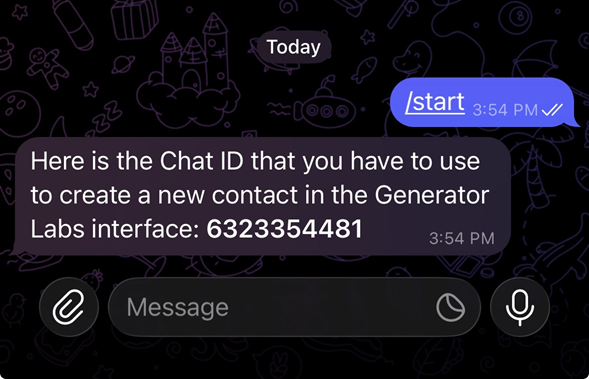
The Generator Labs bot will automatically reply, and give you the Chat ID that you need to paste into the new contact in the Portal.
In the Portal
Go to the Contacts ➡️ Manage ➡️ Contacts section of the Portal, and click the Add Contact button in the top right corner:
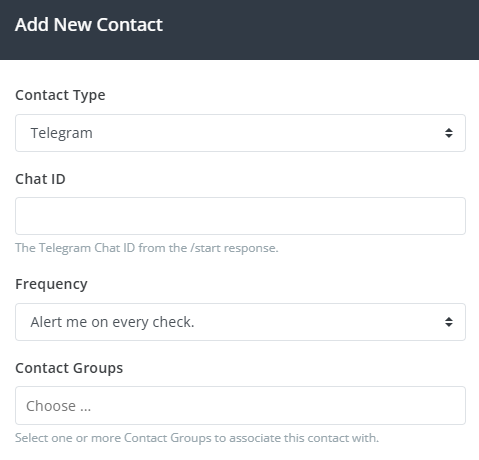
Select Telegram from the Contact Type drop-down, enter the Chat ID in the Chat ID field, select a Frequency, and select one or more Contact Groups to associate with this new contact.
Once you've added the new contact, you'll immediately be able to start using it.
The Frequency setting only applies to RBL Monitoring and will be removed in a future update. Other products such as Certificate Monitoring have their own alerting options.