Selecting a Contact Schedule
:::caution Frequency Setting Being Phased Out The per-contact Frequency setting described on this page currently only applies to RBL Monitoring checks. It is ignored for Certificate Monitoring, which has its own alerting options. This setting will be removed in a future update as alerting options move to product-specific configurations. :::
Each Contact defined in the system can be configured with a simple scheduling option, to control how you receive notifications to that Contact.
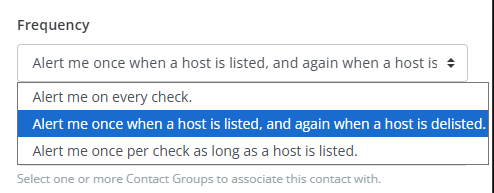
You can select from one of three options:
- Alert me on every check: this Contact will receive a notification on every check.
- Alert me once at the start and end when a host is listed: this Contact will receive a notification anytime a host's status changes (when a host is listed or de-listed).
- Alert me once per check as long as a host is listed: this Contact will receive a notification for every check, as long as a host remains listed. It will not receive a notification when a host is not listed.
:::note Product-Specific Alerting
- Certificate Monitoring: Alerting is configured per monitoring profile. See Adjusting Alerting for details.
- RBL Monitoring: The Frequency setting above still applies for now. :::