MCP Server
The Model Context Protocol (MCP) is an open standard that lets AI assistants connect to external systems and pull live data on the user's behalf. Generator Labs runs a hosted MCP server so that any MCP-aware AI tool (Claude Desktop, ChatGPT, Cursor, GitHub Copilot, and others) can read your RBL and certificate monitoring data, and run on-demand checks, without you having to write any integration code.
What You Can Do
Once connected, you can ask your AI tool things like:
- "Which of my hosts are currently listed on any RBL?"
- "Show me certificates expiring in the next 30 days, grouped by environment."
- "Run an RBL check on
mail.example.comand tell me which sources flagged it." - "Audit my account for cert renewal hygiene over the last 90 days."
- "What alerts went out this week, and to which contacts?"
The AI translates the request into one or more tool calls against your account, returns the results in conversational form, and can chain follow-up queries without you having to context-switch into the portal.
How It Works
The MCP endpoint is hosted at:
https://api.generatorlabs.com/4.0/mcp
It speaks JSON-RPC 2.0 over Streamable HTTP, the standard MCP transport for remote servers. Authentication uses one of:
- HTTP Basic with your existing API application credentials (Account SID + API key).
- OAuth 2.1 with PKCE, including Dynamic Client Registration (RFC 7591): what most AI tools use when you click "Connect" or paste a URL.
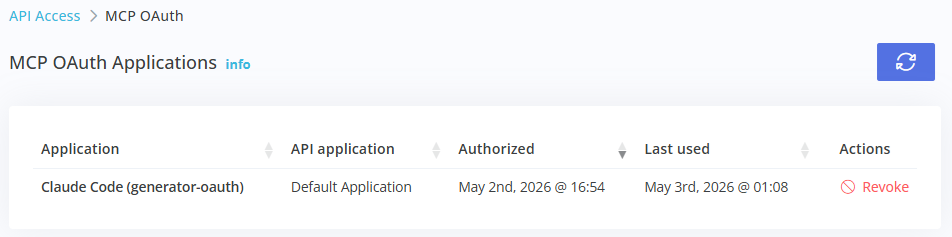
Either way, every request runs against the same per-account API application: your existing rate limits and IP allow-lists apply, OAuth grants are bound to a specific API application chosen at consent time, and you can revoke access at any time from the Portal under Development ➡️ MCP OAuth.
Available Capabilities
The server currently exposes 21 tools across four areas:
| Area | Tools | Scope required |
|---|---|---|
| RBL monitoring | List/inspect hosts, show current listings, drill into per-source detail, run manual checks, view history | mcp:read, mcp:write |
| Certificate monitoring | List/inspect monitors, find expiring or recently-erroring certs, look up event detail, generate compliance audits | mcp:read |
| Notifications | List contacts, contact groups, webhooks, and recent alerts | mcp:read |
| Account & health | Account summary, MCP server health probe | mcp:read |
Plus three preset prompts for multi-step workflows: certificate renewal audit, incident triage, and monthly compliance review.
See the Tool Reference for a full list with example prompts, and the Configuration Guide to wire up your AI tool of choice.
Scopes
OAuth grants request one or more of the following scopes:
mcp:read: read-only access to monitoring data, contacts, alerts, account info.mcp:reports: read public report pages (a separate, narrower scope for share-link integrations).mcp:write: trigger manual RBL checks. This is the only scope that incurs billing (per-check on Ultimate plans, against your daily allotment otherwise).
mcp:write is not included by default in most tool integrations: when an AI tool requests it, you'll see it explicitly listed on the consent screen before approving.
How MCP Compares to the REST API
The MCP server complements the REST API; it is a read-mostly interface optimized for AI tool consumption:
| REST API | MCP | |
|---|---|---|
| Best for | Custom code, scripts, dashboards | Conversational AI tools |
| Transport | HTTP + JSON | JSON-RPC 2.0 over HTTP |
| Auth | HTTP Basic (API key) | HTTP Basic + OAuth 2.1 |
| Surface | Full read + write | Read + manual RBL checks |
| Rate limits | Shared per API application | Shared per API application |
If you're writing your own integration, use the REST API. If you want your AI assistant to access your account, use MCP.