Using the CAA Record Generator
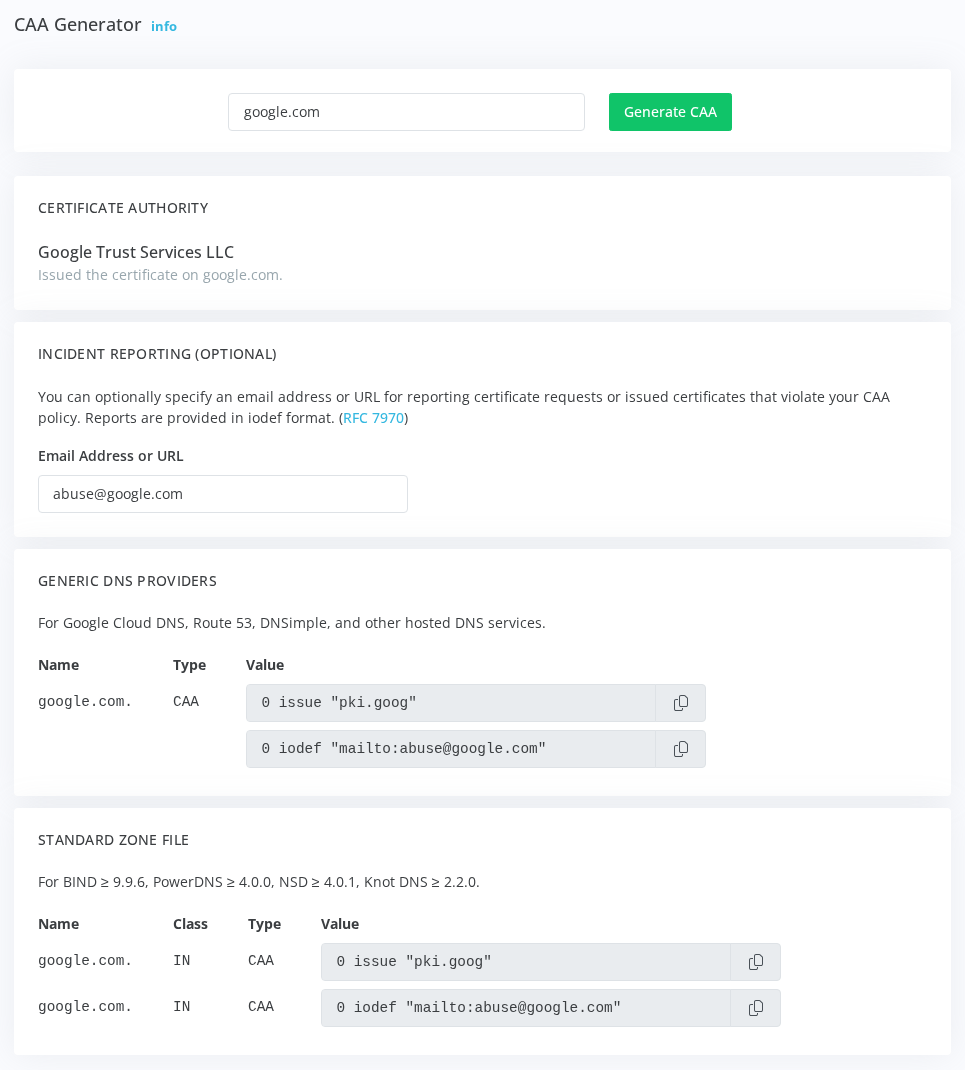
The CAA Generator creates example DNS CAA (Certificate Authority Authorization) record entries based on the certificate currently in use on a specified domain. CAA records specify which Certificate Authorities are authorized to issue certificates for your domain.
What Are CAA Records?
CAA records are DNS records that specify which Certificate Authorities can issue certificates for your domain. When a CA receives a certificate request, it checks for CAA records and will only issue the certificate if authorized. This prevents unauthorized certificate issuance and adds security against mis-issued certificates.
How to Use the CAA Generator
Navigate to Certificate & TLS Monitoring ➡️ Tools ➡️ CAA Generator. Enter a hostname and click Generate CAA. The tool connects to the service, identifies the issuing Certificate Authority from the certificate chain the server sends, and generates CAA records using the CAA identifier that CA publishes.
The Certificate Authority card at the top of the results names the CA, so you can confirm it's the provider you expect before publishing a record. Each record's value has a copy button.
The CA can't be identified for a self-signed certificate, a certificate from a private CA, or a server that doesn't send its intermediate certificate; the tool tells you when that's the case.
The tool provides two output formats:
- Generic DNS Providers - For Google Cloud DNS, Route 53, DNSimple, and other hosted services
- Standard Zone File - For BIND, PowerDNS, NSD, Knot DNS, and similar DNS servers
CAA Record Types
Generated records include:
- issue - Specifies which CA can issue standard certificates for the domain
- iodef - Optional email address or URL for reporting certificate violations; enter it under Incident Reporting and the records update as you type
Adding CAA Records to Your DNS
Copy the appropriate record format for your DNS provider and add it to your domain's DNS zone. Most hosted DNS services have a CAA record type option in their interface. For zone file-based DNS servers, add the records to your zone file and reload the configuration.
After adding CAA records, verify them using DNS lookup tools. Records should propagate within minutes to hours depending on your DNS provider and TTL settings.
Important Limitations
The CAA Generator builds records for the CA that issued the certificate your server sends today. Check that the CA it names is the one you intend to keep using before adding the records to production DNS.
The tool analyzes the certificate currently in use. If your domain uses certificates from multiple CAs or you plan to change CAs, adjust the generated records accordingly.
CAA Record Monitoring
Certificate monitoring can alert on missing or misconfigured CAA records. Enable the Alert on missing / misconfigured DNS CAA records option in your monitoring profiles to receive notifications if CAA records are absent or improperly configured. See the CAA findings for every problem the check reports and how to fix it.