Adding a New Monitoring Profile
Creating a monitoring profile allows you to define custom validation and alerting settings that can be applied to multiple monitors. Navigate to Certificate & TLS Monitoring ➡️ Manage ➡️ Profiles and click the Add Profile button.
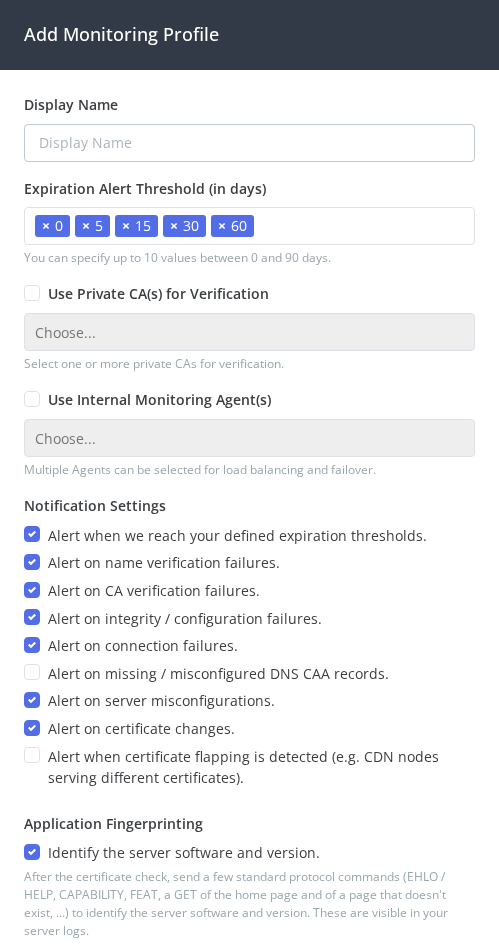
Configuration Fields
The Display Name field assigns a descriptive name to the profile. Use names that indicate the profile's purpose, such as "Production Profile", "Internal Services", "Staging Environment", or "Private CA Profile".
Expiration Alert Threshold (in days) defines when alerts are triggered as certificates approach expiration. You can specify up to 10 values between 0 and 90 days. Click the values to add thresholds, and click the X to remove them. Common configurations include:
- Aggressive monitoring: 90, 60, 45, 30, 15, 7, 3, 1, 0
- Standard monitoring: 60, 30, 15, 7, 0
- Minimal monitoring: 30, 7, 0
The system sends alerts when a certificate's remaining lifetime reaches any of these thresholds.
Use Private CA(s) for Verification enables validation against custom or internal Certificate Authorities instead of public trust stores. Check this option and select one or more private CA certificates from your configured Private CAs. This is essential for monitoring internal services, development environments with self-signed certificates, or any service using a private PKI infrastructure. See importing a private CA for information on uploading custom CA certificates.
Use Internal Monitoring Agent(s) specifies which monitoring agents should connect to hosts using this profile. Select one or more agents and the system will load balance requests between them. Leave unchecked to monitor over the public internet. See installing monitoring agents for deployment instructions.
Notification Settings controls which types of errors generate alerts. Enable or disable specific conditions:
- Alert when we reach your defined expiration thresholds - Triggers alerts based on the threshold values configured above
- Alert on name verification failures - Hostname doesn't match certificate CN or SANs
- Alert on CA verification failures - Certificate chain cannot be validated or uses untrusted CA
- Alert on integrity / configuration failures - Issues with certificate configuration or server setup
- Alert on connection failures - Cannot establish connection to the monitored service
- Alert on missing / misconfigured DNS CAA records - DNS CAA records are missing or improperly configured
- Alert on server misconfigurations - The addresses behind the hostname serve different certificates
- Alert on certificate changes - The certificate was replaced outside a normal renewal
- Alert when certificate flapping is detected - The certificate keeps changing between checks, for example when CDN nodes serve different certificates
Application Fingerprinting (on by default) identifies the server software and version on each check, so the monitor's report can name it and point you to its TLS setup guide. After the certificate check, it sends a few standard protocol commands that are visible in your server logs; see what our checks look like in your logs. Turn it off to have the check only read the certificate and the service's greeting.
See adjusting alerting for what each setting covers. Disable specific alert types if you expect certain conditions and don't want to receive notifications. For example, you might disable CA verification alerts for known self-signed certificates or disable DNS CAA alerts for internal services.
After Creating
Once created, the profile appears in your profiles list showing its display name, status, how many monitors are using it, and its unique system identifier (SID). Assign the profile to monitors when creating new monitors or editing existing ones. Any changes to a profile immediately affect all monitors using that profile.